Emacs Init: Display Lambda as λ
- Alt+x
prettify-symbols-mode -
Display the word “lambda” as λ, in current buffer.
(New in Emacs 24.4 (Released 2014-10).)
- Alt+x
global-prettify-symbols-mode -
Globally. Put this in your Emacs Init File:
(global-prettify-symbols-mode 1)
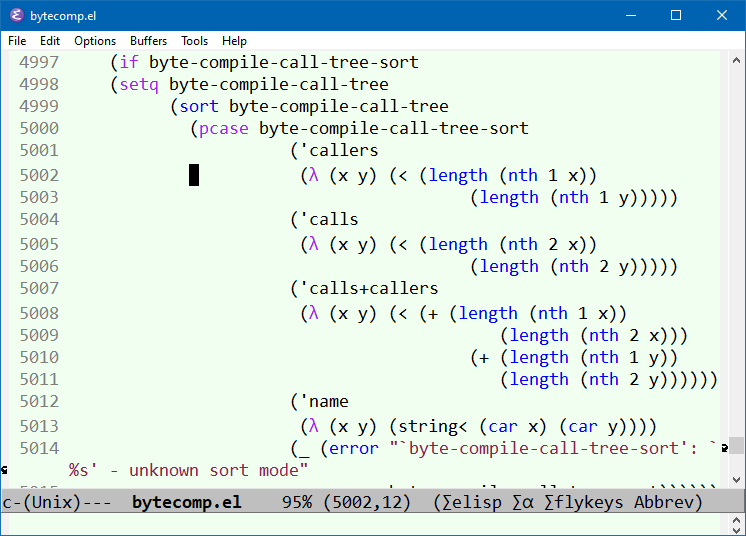
Add Support for Pretty Symbols Mode
prettify-symbols-mode only works for major modes that supports it.
To add support, in your major mode, do:
(setq prettify-symbols-alist '(("lambda" . 955)))
The 955 is Unicode codepoint for λ in decimal. [see Emacs: describe-char, Char Name, Cursor Position]
You can add other pairs. For example, to have arrow, do:
(setq prettify-symbols-alist
      '(
        ("lambda" . 955) ; λ
        ("->" . 8594)    ; →
        ("=>" . 8658)    ; ⇒
        ("map" . 8614)    ; ↦
        ))
You can add it as a Hook for any major mode. Here's a example:
(defun my-add-pretty-symbol ()
  "make some word display as Unicode symbols"
  (setq prettify-symbols-alist
        '(
          ("lambda" . 955) ; λ
          ("->" . 8594)    ; →
          ("=>" . 8658)    ; ⇒
          ("map" . 8614)   ; ↦
          )))

(add-hook 'clojure-mode-hook 'my-add-pretty-symbol)
(add-hook 'haskell-mode-hook 'my-add-pretty-symbol)
(add-hook 'tex-mode-hook 'my-add-pretty-symbol)
For other math symbols you might want to add, see:
Emacs Font Setup
- Emacs: Change Font Size
- Emacs: Change Default Font Size by Command, for Current Session 🚀
- Emacs: describe-char, Char Name, Cursor Position
- Emacs: Toggle Monospace/Proportional Font
- Best Unicode Fonts for Programer
- Emacs: Cycle Fonts by Command 🚀
- Emacs Init: Setup Font
- Emacs Init: Font for Unicode Symbols
- Emacs Init: Font for Emoji
- Emacs Init: Font for Chinese
- Emacs Init: Variable Pitch Mode (Proportional Font)
- Emacs Init: Modify Default Face (Font)
- Emacs Init: Display Lambda as λ