Emacs: Change Font Size
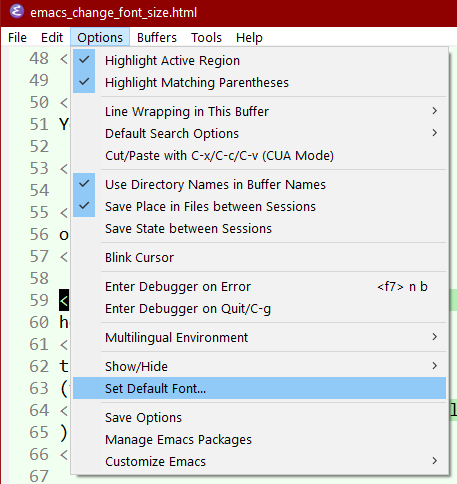
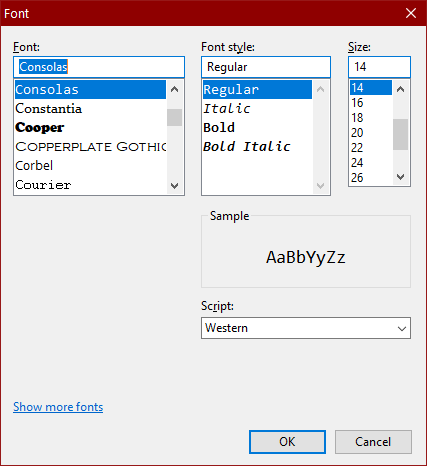
Change Font Size Globally via Menu
Change Font Size Globally by Mouse
new in Emacs 29 (Released 2023-07)
hold down
Ctrl+Meta
then scroll mouse wheel.
(the command name is
mouse-wheel-global-text-scale
)
Change Font Size Globally by Command
new in Emacs 29 (Released 2023-07)
Alt+x global-text-scale-adjust
then press
- = → Globally increase font size
- - → Globally decrease font size
- 0 → Globally reset font size
You can press them repeatedly. Press any key to exit.
Change Current Buffer Font Size by Command
- Alt+x
text-scale-increase - Make font size larger in current buffer.
- Alt+x
text-scale-decrease - Make font size smaller in current buffer.
- Alt+x
text-scale-adjust - Changes font size in current buffer. Call it, then press + to increase, - to decrease. You can press them repeatedly. Press 0 to set it back to default size. Press any key to exit.
Change Current Buffer Font Size by Mouse
Hold Ctrl then mouse scroll up or down.
(
the command called is
mouse-wheel-text-scale
)
Works in {Windows, Mac, Linux}.
To set a font and size across sessions, see Emacs Init: Setup Font
Emacs Font Setup
- Emacs: Change Font Size
- Emacs: Change Default Font Size by Command, for Current Session 🚀
- Emacs: describe-char, Char Name, Cursor Position
- Emacs: Toggle Monospace/Proportional Font
- Best Unicode Fonts for Programer
- Emacs: Cycle Fonts by Command 🚀
- Emacs Init: Setup Font
- Emacs Init: Font for Unicode Symbols
- Emacs Init: Font for Emoji
- Emacs Init: Font for Chinese
- Emacs Init: Variable Pitch Mode (Proportional Font)
- Emacs Init: Modify Default Face (Font)
- Emacs Init: Display Lambda as λ