Windows: Windows Logo Key Shortcuts
Here's list of the Windows logo key keyboard shortcuts.
Dictation, Speech to Text, Voice Typing
- 🪟 Windows+h
-
start online speech recognition
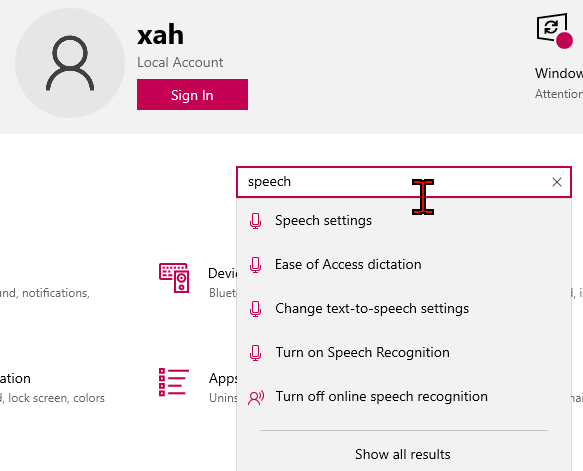
win10 Speech to Text 2025-12-04 1e10a 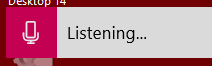
win10 Speech to Text 2025-12-04 1df4d - 🪟 Windows+Ctrl+Shift
-
start local speech recognition (very bad. old.)
window show hide, maximize, etc
- 🪟 Windows+Tab
-
Show all windows.
- 🪟 Windows+d
-
Show desktop by minimize all windows.
- 🪟 Windows+m
-
Minimize all windows.
- 🪟 Windows+Shift+m
-
restores Minimize all windows, if pressed right away after 🪟 Windows+m
- 🪟 Windows+Home
-
Hide all other windows. Press again to show.
- 🪟 Windows+↑
-
Maximize window.
- 🪟 Windows+↓
-
Restore window size.
- 🪟 Windows+Shift+↑
-
Maximize window vertically.
- 🪟 Windows+Shift+↓
-
Restore vertical size or hide window.
- 🪟 Windows+←
-
Align window to the left side, max it vertically.
- 🪟 Windows+→
-
Align window to the right side, max it vertically.
- 🪟 Windows+Shift+←
-
Move window to the previous monitor.
- 🪟 Windows+Shift+→
-
Move window to the next monitor.
screenshot
- 🪟 Windows+Shift+s
-
Start screenshot.
- 🪟 Windows+PrintScreen
-
Screenshot whole screen to file, at
~/Pictures/Screenshots/folder. - 🪟 Windows+Alt+PrintScreen
-
Screenshot current window to file, at
~/Videos/Captures/folder.
launch app etc
- 🪟 Windows
-
Start menu.
- 🪟 Windows+r
-
Run program by name.
- 🪟 Windows+e
-
open file explorer.
- 🪟 Windows+1 to 9 and 0
-
Launch/Switch taskbar app 1, 2 etc. 0 is 10th.
- 🪟 Windows+Shift+1 to 9 and 0
-
Start a new taskbar app 1, 2, etc. 0 is 10th.
- 🪟 Windows+Alt+1 to 9 and 0
-
list options for taskbar app 1, 2, etc. 0 is 10th.
screen zoom
- 🪟 Windows+=
-
screen zoom-in.
- 🪟 Windows+-
-
screen zoom-out.
- 🪟 Windows+Esc
-
Exit screen zoom.
quick link, restart shutdown, system
- 🪟 Windows+x
-
Opens Quick Link menu.
- 🪟 Windows+x f
-
Apps and features
- 🪟 Windows+x o
-
Power options
- 🪟 Windows+x v
-
Event viewer
- 🪟 Windows+x y
-
System
- 🪟 Windows+x m
-
Device manager
- 🪟 Windows+x w
-
Network connections
- 🪟 Windows+x k
-
Disk management
- 🪟 Windows+x g
-
Computer management
- 🪟 Windows+x i
-
Windows PowerShell
- 🪟 Windows+x a
-
Windows PowerShell (Admin)
- 🪟 Windows+x t
-
Task manager
- 🪟 Windows+x n
-
Settings
- 🪟 Windows+x e
-
File explorer
- 🪟 Windows+x s
-
Search
- 🪟 Windows+x r
-
Run
- 🪟 Windows+x u i
-
Sign out
- 🪟 Windows+x u s
-
Sleep
- 🪟 Windows+x u u
-
Shutdown
- 🪟 Windows+x u r
-
Restart
- 🪟 Windows+x d
-
Desktop
editing, emoji, paste
- 🪟 Windows+v
-
Paste from clipboard history. Must turn on clipboard history in [settings, system, clickboard].
- 🪟 Windows+.
-
Open emoji panel.
settigs
- 🪟 Windows+k
-
Open the Connect quick action.
- 🪟 Windows+Space
-
Switch language or keyboard layout.
- 🪟 Windows+i
-
Open settings.
- 🪟 Windows+u
-
Open display settings.
- 🪟 Windows+t
-
Cycle thru apps on task bar.
- 🪟 Windows+L
-
Lock screen.
- 🪟 Windows+a
-
Open action center (notifications).
- 🪟 Windows+s
-
Open search.
- 🪟 Windows+g
-
Open game bar.
- 🪟 Windows+Pause
-
Open System Properties.
- 🪟 Windows+b
-
Select the first icon in the Notification Area.
- 🪟 Windows+p
-
Choose a presentation display mode (set screen to clone on 2nd monitor, etc.).
- 🪟 Windows+f
-
Open feedback.
- 🪟 Windows+Alt+Enter
-
Start Windows Media Center interface.
- 🪟 Windows+F1
-
Open Windows Help.
- 🪟 Windows+Ctrl+f
-
Open Search for Computers. Requires Active Directory Domain Services.
- Ctrl+🪟 Windows+Shift+Return
-
to launch as administrator.
- Ctrl+🪟 Windows+Shift+1
-
to launch the first application of the menu bar as administrator (2 for the second etc.)