HTML: Syntax Basics
Basic Structure
HTML is a very simple markup language.
Here's a example.
Save the following text in a file, name it sample.html, then open the file in a browser.
<!doctype html>
<html>

 <head>
  <meta charset="utf-8" />
  <title>Sample HTML</title>
 </head>

 <body>
  <h1>Sample HTML</h1>
  <p>Earth is round</p>
 </body>

</html>
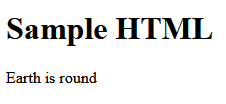
it shows in browser like this
HTML Syntax
Text are enclosed by tags. For example
<head>…</head>→ contains meta info about the file.<title>…</title>→ gives the title of the file.<body>…</body>→ is content of the file.<h1>…</h1>→ is the header of the content.<p>…</p>→ is a paragraph.
Opening and Closing Tags
Each of the <name> is called a tag.
<name>is called opening tag.</name>is called closing tag.
Self Closing Tags
Some tags do not require the closing tag.
Most Important Tags
Here is the most frequently used tags.
Headers tags
There are 6 of them.
<h1>…</h1>-
First level heading
<h2>…</h2>-
Second level heading
<h3>…</h3>-
Third level heading
<h4>…</h4>-
4th level
<h5>…</h5>-
5th level
<h6>…</h6>-
6th level. There is no 7th.
Paragraph
<p>…</p>-
Paragraph. Can contain multiple lines.
line-break
<br />-
force a line-break. [see HTML: List of Self-Closing Tags]
Literal Text block
<pre>…</pre>-
Literal text block. Can contain multiple lines. Usually used for Computer Code or poem.
Blockquote
<blockquote>…</blockquote>-
block quote. Can contain multiple lines and other markups such as paragraph or list.
Unordered List
<ul>
<li>list item 1</li>
<li>list item 2</li>
</ul>
[see HTML: List (ul ol li)]
Ordered List
<ol>
<li>ordered list item 1</li>
<li>ordered list item 2</li>
</ol>
Link
<a href="url">description</a>-
Link to a website.
<a href="http://example.com/">http://example.com/</a>
Image
<img src="filepath" alt="description" />-
embed image.
<img src="my_cat.jpg" alt="my cat" />
bold
<b>…</b>-
bold
italics
<i>…</i>-
italics
Literal Inline Code
<code>…</code>-
literal inline text. usually used for computer code.
Generic Inline Text Markup
<span>…</span>-
general markup for inline text. It is similar to the bold tag
bbut without any meaning.
Generic Block Markup
<div>…</div>-
general markup for a block of text. It is similar to
p. Usually used to group other elements inside.
Element's Attributes
Each element may have attributes.
The syntax for attributes are like this:
<p name=value>…</p>
or
<p name>…</p>
The one without the equal sign is called boolean attributes. They are rare.
What attributed are allowed for each elements depends on the element.
Most Important Attributes: class, id
Two most frequently used attributes, can be used on any element, are class
and id
attributes.
<p class="xyz">the class attribute allows a element to be identified by CSS and JavaScript.</p>
<p id="x34">the id attribute allows a element to be identified by CSS and JavaScript. ID value must be unique per HTML page.</p>
A element can have many attributes. For example, here's a inline image:
<p id="x34" class="xyz">I traveled around the world.</p>
The class and id attributes are used by Cascading Style Sheet and JavaScript to identify a element.
Case Sensitivity
Versions of HTML
There are many versions of HTML and XHTML, and it is really a mess, after 3 decades of history.
If you are creating new pages, i recommend HTML5. Put the following line at the beginning of your file.
<!doctype html>