Xah Fly Keys News
major changes are logged here. but sometimes minor change also here.
sevaral trivial updates.
• xah-run-current-file now make output the active windows. (was trying to fix the situation when output has more lines than fits buffer height the lines at top are not within visible window.)
• xah-reformat-lines now default to width 60. was 70.
• some xah-unicode-list change. you should customize your own.
• xah-select-text-in-quote now hard code list of brackets. not rely on var xah-brackets. behavior is the same.
• other minor updates. xah-cut-text-in-quote. xah-brackets xah-left-brackets xah-right-brackets xah-backward-left-bracket xah-right-brackets
xah-close-current-buffernow, after the command, the buffer shown is always a user bufer. (this is the behavior few years ago. experimental.) New commands that support this is xah-close-current-buffer-hook andxah-switch-to-user-buffer
xah-close-current-buffernow save the file if not saved, and close it.- changed unicode chars for variable xah-unicode-list. (you should customize it.)
now key t (dvorak y) is back to set-mark-command, because seems a simple key for that basic command is commonly wanted. (was xah-fly-cancel). experimental. thanks to spiderbit #194
xah-extend-selectionnow does not select whole bracketed text when cursor is on any right brackets. Also, when on a QUOTATION MARK (codepoint 34), it selects the whole string correctly.- added a key E (CAP E) for
delete-backward-char. experimental. still haven't figured out. i think something need to be done with xah-extend-selection to make it select just 1 char.
New commands xah-goto-line and xah-goto-char replacing emacs goto-line and goto-char. They allow you goto the number under cursor, and in next pane. Useful in error output.
- key change for
xah-delete-current-file-make-backupxah-clear-register-1xah-append-to-register-1xah-copy-to-register-1xah-paste-from-register-1
- also, now these do block if no selection, instead of line.
xah-append-to-register-1xah-copy-to-register-1
xah-change-bracket-pairsadded square bracket with underbar ⦋ ⦌- var xah-unicode-list, added some new unicode by default.
- added new leader key “space t l” (dvorak notation) for
xah-cycle-hyphen-lowline-space
- Changed xah-repeat-key, if unbound, default to key . (period).
- Removed
xah-copy-allxah-cut-all, they are not used. usexah-copy-all-or-regionandxah-cut-all-or-region.
- New variable xah-fly-remove-control-x-keys
- removed
xah-next-emacs-buffer,xah-previous-emacs-buffer, because they are not very useful. Maybe add them toxah-next-user-bufferwithuniversal-argument.
xah-insert-dateadded a new dotted version format e.g. 2025.09.04. used for date as version numbering.xah-extend-selectionnow when on whitespaces, start from cursor position. (was selecting whole whitespaces.) experimental.xah-user-buffer-pnow consider dired as user buffer. used byxah-next-user-buffer- version numbering now changed to a date system e.g. 2025.09.04, but syntax remain compatible with the dotted version numbering system.
removed redundant commands.
unused:
xah-unfill-paragraph,
xah-unfill-region,
xah-change-newline-chars-to-one
merged
xah-reformat-whitespaces-to-one-space,
xah-reformat-to-multi-lines
to
xah-reformat-lines
minor key changes.
- swapped keys
- - (". e" .
isearch-forward-symbol-at-point) - + (". p" .
isearch-forward-symbol-at-point) - - (". p" .
isearch-forward-word) - + (". e" .
isearch-forward-word)
- removed kill-line.
- changed key for
exchange-point-and-mark. - - ("i w" .
exchange-point-and-mark) - - ("i i" .
kill-line) - + ("i i" .
exchange-point-and-mark)
- changed text-scale-adjust to global-text-scale-adjust.
- - ("n a" .
text-scale-adjust) - + ("n a" .
global-text-scale-adjust)
- removed ("n SPC p" .
global-display-line-numbers-mode) - use istead ("n SPC d" .
display-line-numbers-mode) - or set in init.
- added (global-set-key (kbd "M-SPC") #'
xah-fly-command-mode-activate). this is good for beginners.
- xah-fly-use-meta-key is back to nil.
xah-cut-all-or-regionnow prints message if whole buffer is cut.
- fixed neo2 layout. thanks to sieman.
- added cursor color, thanks to admacro.
- xah-fly-command-mode-cursor-color
- xah-fly-insert-mode-cursor-color
major key change, left hand key for selection
- major key change. significant ergonomic improvement.
- basically, swapped y and i keys, and other related to that.
- (all dvorak notation.)
- in command mode, now
- key i is for
xah-extend-selection. (wasxah-delete-current-text-block) - key y is
xah-fly-cancel. (wasset-mark-command). It can be used to cancel selection also cancel other things.
Reason, key i is much more ergonomic than y. Because you can move hand, instead finger. So, moved y for text selection to i.
As for y, after many experiment, it is set to xah-fly-cancel, a new command, that can be used to cancel selection and otherwise behave like Ctrl+g.
And now make all leader keys of 【space y】 and 【space i】 be consistent.
- and
xah-extend-selectionis modified. now this command is become super useful for selecting text, now with a prominent key.
- Also,
xah-smart-deletenow put text in kill-ring when there is a selection, so it is easy to press i to select a word, right hand to adjust selection, then left hand e to cut.
current, in command mode,
- ("y" . xah-fly-cancel)
- ("i" . xah-extend-selection)
current, leader keys,
- ("i SPC" . set-mark-command)
- ("i w" . exchange-point-and-mark)
- ("i i" . kill-line)
- ("i m" . xah-pop-local-mark-ring)
- ("i j" . xah-show-kill-ring)
- ("i d" . xah-delete-current-text-block)
- ("i h" . xah-select-block)
- ("i t" . xah-select-text-in-quote)
- ("i s" . xah-select-line)
- they were 【space y】. now that leader sequence is empty.
- removed leader
- ("o" . exchange-point-and-mark)
other minor key change:
- old
- ("k x" . xah-upcase-sentence)
- new
- ("k b" . xah-upcase-sentence)
- reason: easier keys, alt hands.
experimental. using capital letter key (Shift) in command mode
- now removed all experimental keys with shift. now there is no command that requires shift key.
xah-extend-selectionnow can repeat by xah-repeat-key.
following is all dvorak notation.
- removed, in command mode:
- ("H" . xah-extend-selection)
- ("T" . xah-select-text-in-quote)
- ("D" . xah-select-block)
- ("U" . delete-char)
- ("E" . delete-backward-char)
- new, leader key sequence:
- ("y h" . xah-extend-selection)
- ("y t" . xah-select-text-in-quote)
- ("y i" . xah-select-block)
swapped back the keys for save-buffer and end-of-buffer. (now, dvorak s and b.)
Reason: last week we swapped the keys.
the reason was to be more consistent with the dvorak s (qwerty ;) for end command the xah-end-of-line-or-block.
but turn out, this is not too ergonomic.
in other words, we gained little consistency at the expensive of little inefficiency.
so, swapping them back now.
- Removed the key qwerty colon 【:】 (dvorak S) for
xah-select-line. Reason: keybinding requiring shift is not very good. 【shift+;】 is not much more efficient than the alternative 【d t ;】 This was just added few weeks ago for experiment. Possible removing the 3 or so other commands with shift key.
- changed keys.
xah-pop-local-mark-ringwas dvorak Y (qwerty T) in command mode. now dvorak space y y (qwerty space t t). press RET to repeat. xah-show-kill-ringhad dvorak space y (qwerty space t), now is dvorak space y y (qwerty space t t)
swapped the keys for end-of-buffer (new key 【space ;】) and save-buffer (new key 【space n】). (both qwerty notation)
reason: this is to be consistent with the command mode key for xah-end-of-line-or-block. the reason it was not before is because i was just picking the dvorak s for save-buffer.
- 2025-07-08
- continue previous key change. reverted change of key for dvorak i (qwerty g). now it is
xah-delete-current-text-blockagain. (notxah-select-block) - because, otherwise, the only way to delete AND copy selection is via key dvorak q (qwerty x), which is harder than index finger on dvorak i.
- 2025-07-07
- major key change. experimental.
- removed all number keys
- 【3】
delete-other-windows - 【4】
split-window-below - 【5】
delete-char - 【6】
xah-select-block - 【7】
xah-select-line - 【8】
xah-extend-selection - 【9】
xah-select-text-in-quote - 【0】
xah-pop-local-mark-ring
new is
- 【H】
xah-extend-selection - 【T】
xah-select-text-in-quote - 【S】
xah-select-line - 【U】
delete-char - 【E】
delete-backward-char - 【Y】
xah-pop-local-mark-ring
- and
- ("i" . xah-delete-current-text-block)
- changed to
- ("i" . xah-select-block)
xah-pop-local-mark-ringnow can repeat by xah-repeat-key.
- reason:
- the number keys are on top row, hard to type, especially for touch typist.
- personally, they been causing permanent hand injury for me, e.g. the keys 1 2 3 in 2010 and 2016.
- see Xah Lee, Typing Experience and Repetitive Strain Injury
- also, in past decade, many ergonomic keyboards don't have direct number keys.
- new is introducing shift key combo.
- the disadvantage is now require 2 key strokes, but now easier positions.
- recommended is to turn on sticky keys in operating system.
- also, all these commands are extra convenience, not core necessary ones.
- now the number row keys are free, you can press them directly to insert number when in command mode.
which-key-modeis now on by default, when available.
- Removed key Home and F8 for
xah-fly-command-mode-activate. Reason: too many keys to activate command mode. Also, now escape key now works in terminal since emacs 28. Also, in past 5 or more years, fewer keyboard has home key and F8.
- Removed the feature of indicating current command/insert status in mode line by first char of c and i.
- Because they are not useful.
- Mode line is at bottom, usually not in eye focus.
- Few people looks at it.
- Also, because now current line color serve as indicator.
- Also, made cursor color change.
- When in command mode, it is now red.
- Also, pressing esc always gets one in command mode.
- so knowing current mode status is technically not necessary.
- Variable removed are
xah-fly-command-mode-indicatorandxah-fly-insert-mode-indicator.
new variable xah-fly-command-mode-hl-line. If true, highlight current line when in command mode. by default it is on.
- changed default xah-repeat-key to RET
- removed the xah-repeat-key for
xah-forward-punctxah-backward-punct. use arrows.
- xah-fly-use-control-key is now default to true again.
- removed setting to nil of many emacs defaults keys starting with Control key.
- reason: support by default the standard key for open close save cut copy paste undo, and, do not remove the emacs default keys because new users of Xah Fly Keys can adopt easier.
- removed previous commit addition of
isearch-backward. reason, it does not save keystroke, but using cap letter key adds complexity.
- commands with new key:
enlarge-window,xah-upcase-sentence
- changed keys for commands that are related to visual display. now all grouped with same prefix:
- old keys (dvorak notation):
- 【n SPC】
whitespace-mode - 【n 2】
global-hl-line-mode - 【n 4】
global-display-line-numbers-mode - 【n l】
toggle-word-wrap - 【n o】
variable-pitch-mode - 【n v】
visual-line-mode - 【n y】
toggle-truncate-lines - 【n d】
display-line-numbers-mode
- new keys:
- 【n SPC SPC】
whitespace-mode - 【n SPC t】
visual-line-mode - 【n SPC h】
toggle-word-wrap - 【n SPC n】
variable-pitch-mode - 【n SPC s】
toggle-truncate-lines - 【n SPC d】
display-line-numbers-mode - 【n SPC ,】
global-hl-line-mode - 【n SPC p】
global-display-line-numbers-mode
- added these new keys related to windows, and removed some old using digit keys. all dvorak notation.
- 【k h】
delete-other-windows - 【k t】
delete-window - 【k m】
split-window-below - 【k w】
split-window-right - 【k n】
balance-windows - 【k q】
enlarge-window - 【k n】
xah-upcase-sentence - 【k s】
ispell-word
- 2024-04-23 added a russian layout
2024-04-22 Major rewrite the keyboard layout code.
Before, to define a new layout, you have to create a alist of key mappings:
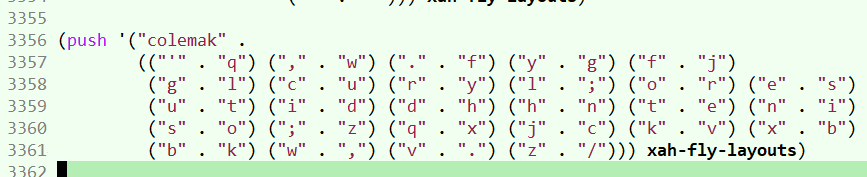
now, you just draw a text diagram:
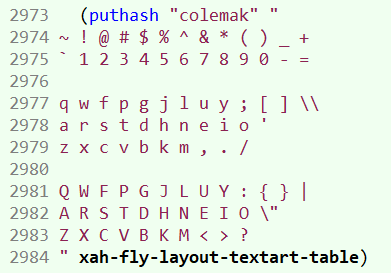
Lots new layouts, some esoteric removed.
- 2023-03-18 now Esc by default activates command mode, but only when emacs runs in GUI mode. [see Emacs: Xah Fly Keys Design, Binding Escape Key]
- 2022-10-25 to 2022-10-26 More major internal change.
No user visible change.
xah-fly--key-charis now gone. Replaced byxah-fly--convert-kbd-str. Explicitly named keymaps e.g.xah-fly-Rp2p1-key-maporxah-fly-c-key-mapare gone. Now their keymap is just part ofxah-fly-leader-key-map. Much simpler. - 2022-10-22 major internal change. Variable xah-fly-layouts holds a list of layouts. Function
xah-fly-keys-set-layoutno longer support M-x customize. Reason: supporting it makes the code much more complex. - 2022-09-11 major change and fix for colemak dh layouts, now accurate names: colemak-dhm, colemak-dhm-angle, colemak-dhk
- 2022-06-11 Xah Fly Keys now on nonGnu ELPA. lots other code updates in past year.
- 2021-06-23 added 3 more keys to neo2 layout. by sieman, pull request #122
- 2021-06-23 added bepo layout, by brabalan. pull request #121.
- 2021-05-19 added layouts • carpalx-qgmlwy • carpalx-qgmlwb • carpalx-qfmlwy. Thanks to uwusual
- 2021-02-21 now supports pt-nativo layout (for Portuguese). Thanks to xavierpinho. [see Portuguese Ergonomic Keyboard Layout: pt-Nativo]
- 2021-02-09 now supports ergo layouts for germany: neo2, koy, adnw. Thanks to VitruvianVice.
- 2020-07-12 the old version of xah fly keys before the key engine change on 2020-04-27 is now at xah-fly-keys_old_2020-04-18.el
- 2020-04-27 Major engine rewrite, by Dan Langlois and Will Dey (wi11dey). Big thank you. Now, xah fly keys has priority, won't have the very annoying problem in modes like magit and org. In next few days am going to update the customization page. Vast majority of code will work as is. If you have problem, goto xahlee discord, or file a bug report.