Wolfram: Graphics Directive
What is Graphics Directive
Graphics Directives are things like color, thickness. They control the style and rendering of Graphics Primitive .
Here are commonly used graphics directives:
RedGreenBlueHueGrayLeveletc.OpacityPointSizeThicknessDashed- more
3D Graphics Directives
EdgeFormFaceFormAmbientLightPointLightDirectionalLightSpotLight- more
List of All Graphics Directives
How to Apply Graphics Directive
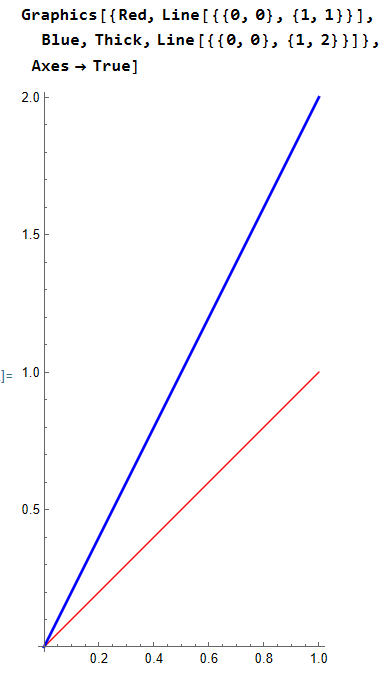
Put directives in a list, preceding primitives. They have effect on the subsequent graphics primitives. e.g.
{Red, Thick, Circle[]}
Example
Graphics[{Red, Circle[ ]} , Axes -> True ]

Graphics[{Red, Circle[ ], Line[{{0,0},{1,1}}] }, Axes -> True ]
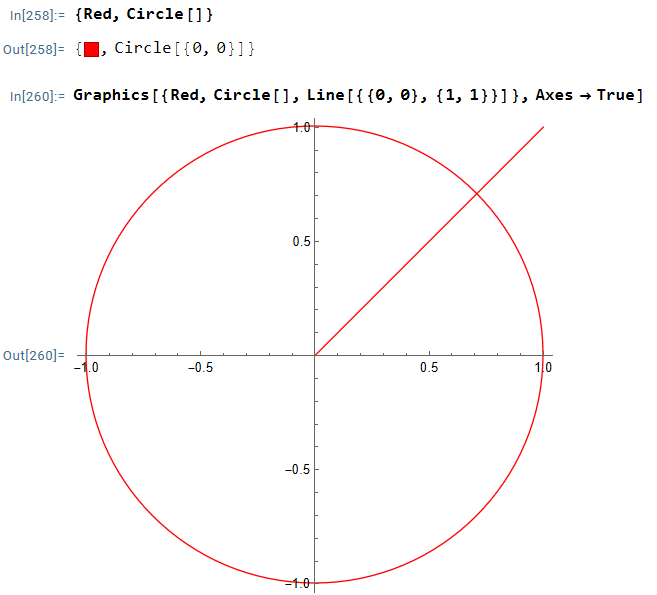
Example
Graphics[{Red, Line[{{0,0},{1,1}}], Blue, Thick, Line[{{0,0},{1,2}}] }, Axes -> True ]
Grouping Graphics Directives
you can group several graphics directives as a single entity.
Directive. Group Graphics Directives
Directive-
Group several graphics directive into one. e.g.
Directive[Red, Thick]orDirective[{Red, Thick}]Graphics[{ Directive[Red, Thick], Line[{{0,0},{1,2}}] }, Axes -> True ]
Style. Group Directives and Primitives
Style[prim, directive1, directive1, etc]
example
Style[Circle[], Red, Thick]