Windows: Disable Ctrl+Alt+S Key for HP Support Info
If you bought your PC from HP/Compaq, then when you press Ctrl+Alt+s, it'll pop up the HP Support Information window. (also, Ctrl+Alt+h pops up the PC Doctor software.)
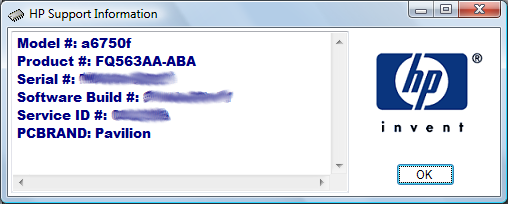
Disable the Hotkey for HP Support Information
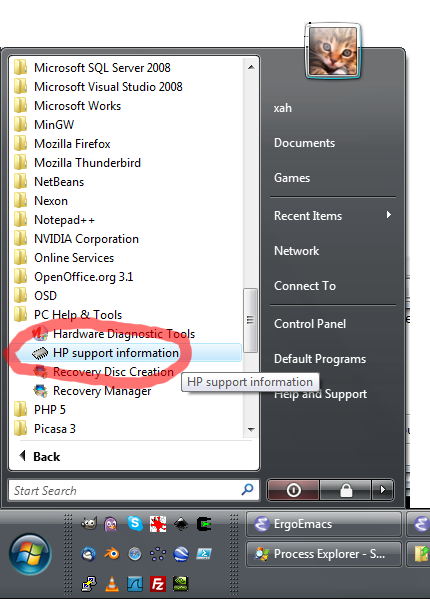
here's steps to remove for Microsoft Windows Vista:
- Open Start menu, look for the folder named “PC Help & Tools”
- Right click the “HP support information”.
- Then, chose Properties.
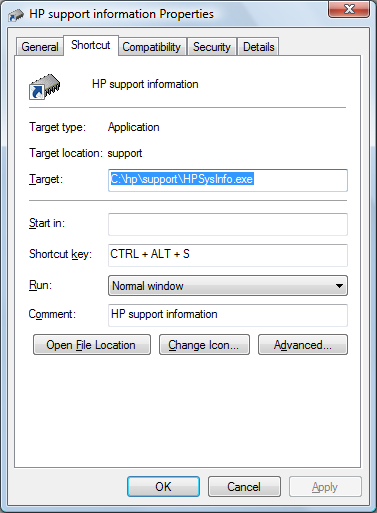
Click on the Shortcut tab, then the Shortcut key field, then press backspace to delete the shortcut key.
You can also find the file directly at one of the following:
C:\ProgramData\Microsoft\Windows\Start Menu\Programs\PC Help & ToolsC:\Documents and Settings\All Users\Start Menu\Programs\PC Help & Tools