CSS: Responsive Table
Problem: Table on Small Screen
You want a HTML Table that can be displayed on a small screen e.g. mobile phone.
(The technique is called “responsive table”)
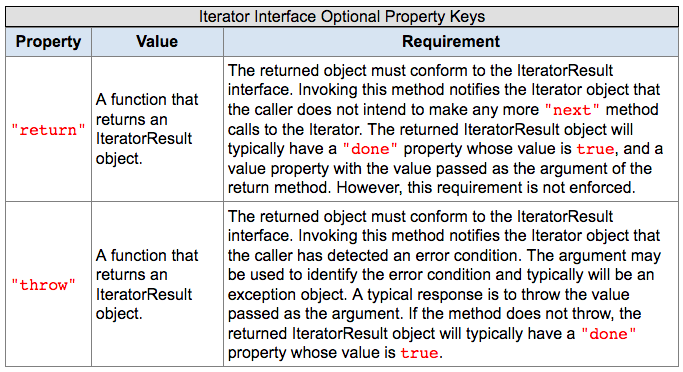
Here is how a table looks on laptop screen.
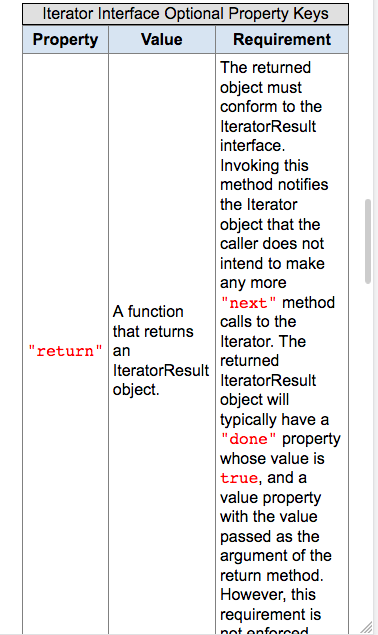
On a small screen, it looks like this:
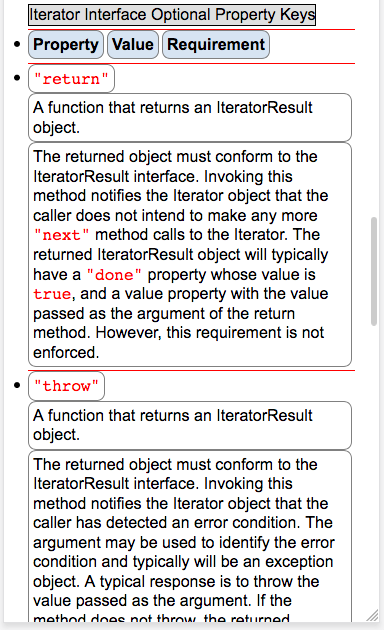
With CSS, you can make it to look like this:
Sample Table Code
| Dec | Oct | Hex | Char | Comment |
|---|---|---|---|---|
| 65 | 101 | 41 | A | Something something long text here. Too long and is a problem when displaying on a small screen. And it is really long, so long that on small narrow width screen one column becomes long strip while other columns are empty space, and page becomes very long, requiring lots scroll. |
| 66 | 102 | 42 | B | Something something long text here. Too long and is a problem when displaying on a small screen. And it is really long, so long that on small narrow width screen one column becomes long strip while other columns are empty space, and page becomes very long, requiring lots scroll. |
Code
<table class="nrm">
 <tr>
  <th>Dec</th>
  <th>Oct</th>
  <th>Hex</th>
  <th>Char</th>
  <th>Comment</th>
 </tr>
 <tr>
  <td>65</td>
  <td>101</td>
  <td>41</td>
  <td>A</td>
  <td>Something something long text here. Too long and is a problem when displaying on a small screen. And it is really long, so long that on small narrow width screen one column becomes long strip while other columns are empty space, and page becomes very long, requiring lots scroll.</td>
 </tr>
 <tr>
  <td>66</td>
  <td>102</td>
  <td>42</td>
  <td>B</td>
  <td>Something something long text here. Too long and is a problem when displaying on a small screen. And it is really long, so long that on small narrow width screen one column becomes long strip while other columns are empty space, and page becomes very long, requiring lots scroll.</td>
 </tr>
</table>
Solution, CSS Responsive Table
Here is the CSS to change the look of table on small screen.
@media all and (max-width: 600px) {
 table {
  display: block;
 }

 table caption {
  display: inline-block;
 }

 table tr {
  display: list-item;
  border: none;
  border-top: solid 2px grey;
  margin: 1ex;
 }

 table th {
  display: inline-block;
  border: solid thin gray;
  margin-right: 0.2rem;
  margin: 1ex;
  border-radius: 1ex;
 }

 table td {
  display: inline-block;
  border: solid thin gray;
  margin: 0.5ex;
  border-radius: 1ex;
 }
}