Google Webfont (tutorial) (2010)
Google has a webfonts project, at
For web authors, it is the most easy way to use a font and have your readers see the same font, in any browser or operating system.
How to use Google Webfont
goto https://fonts.google.com/ pick a font.
get this line, put in your HTML page.
<link rel="stylesheet" href="https://fonts.googleapis.com/css?family=Geo">
Then, specify the font in CSS:
body {font-family: "Geo", serif}
Here is a example HTML:
<html>
<head>

<link rel="stylesheet" type="text/css" href="https://fonts.googleapis.com/css?family=Geo">

<style>
body {font-family: "Geo", serif}
</style>

<title>sample page</title>
</head>
<body>

<p>Once upon a time.</p>

</body>
</html>
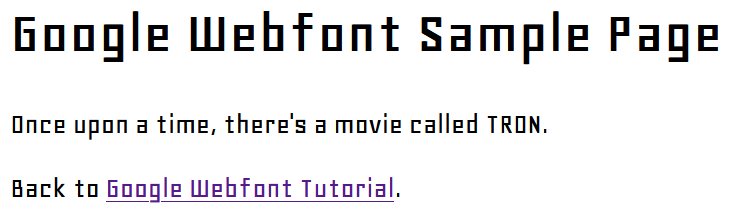
How Does It Work?
If you look at the CSS source code at https://fonts.googleapis.com/css?family=Geo, its content is this:
@font-face {
font-family: 'Geo';
font-style: normal;
font-weight: normal;
src: local('Geo'), local('Geo-Regular'), url('http://themes.googleusercontent.com/font?kit=mJuJYk5Pww84B4uHAQ1XaA') format('truetype');
}
exactly what CSS source code Google sends out is dependent on the reader's browser. For tech detail, see: http://code.google.com/apis/webfonts/docs/technical_considerations.html .